Skip to content

[Batch 1] Migrate seven simple ConfirmModal call sites to useConfirmModal - #100285

Merged
roryabraham merged 6 commits into
mainfrom
claude-migrateConfirmModalBatch1
Sep 8, 2026
Merged

roryabraham merged 6 commits into
mainfrom
claude-migrateConfirmModalBatch1

Conversation

@MelvinBot

@MelvinBot MelvinBot commented Sep 3, 2026 •

Copy link
Copy Markdown
Contributor

Explanation of Change

Batch 1 of the ConfirmModal → useConfirmModal() migration. ConfirmModal is deprecated; these seven call sites are the mechanical ones, where confirm/cancel map directly onto the CONFIRM / CLOSE actions returned by showConfirmModal().

Each migration replaces a declaratively-rendered <ConfirmModal isVisible={...}> plus its useState visibility flag with an imperative showConfirmModal() call in the handler that used to flip that flag.

File Modal Notes
PreferredWorkspaceToggle.tsx "No workspaces" info Confirm and cancel were the same handler, so the promise result is ignored.
SamlLoginSectionContent.tsx Disable SAML required (Okta SCIM) Already passed shouldHandleNavigationBack, kept explicit — zero delta on that prop.
DynamicIOURequestStepUpgrade.tsx Restricted policy creation warning Acknowledgement-only. isUpgradeWarningModalOpen and handleConfirmUpgradeWarning are now dead code and removed.
IOURequestEditReportCommon.tsx Per diem move error Second modal in this file; the first was already migrated.
ExpenseRulesPage.tsx Delete rule(s) Bulk-selection dropdown, same shape as the migrated WorkspaceMembersPage.tsx.
DynamicReportParticipantDetailsPage.tsx Remove from group removeFromGroupChat + goBack now run after the hide animation instead of synchronously.
DynamicRoomMemberDetailsPage.tsx Remove from room Same shape as the row above.

config/eslint/eslint.seatbelt.tsv drops the seven now-resolved @typescript-eslint/no-deprecated/ConfirmModal entries.

Decisions worth a reviewer's attention

  1. shouldHandleNavigationBack is left at the hook's default (true) for the six sites that never passed it. The hook flips undefined → true, so this is a real delta: browser back now dismisses the dialog instead of navigating away. That is the correct behavior for a global modal — it is rendered by ModalProvider and outlives the page that opened it, so passing false would leave an orphaned dialog on top of the next screen. This also matches the already-migrated acknowledgement modal in IOURequestEditReportCommon.tsx, which the issue cites as the precedent.
  2. ExpenseRulesPage captures the selection at show time. The effect that clears selectedRules on every Onyx change means the .then() closure holds the pre-open selection rather than reading selectedRules at confirm time. handleDeleteRules now takes the rule list as a parameter to make that explicit.
  3. A global ENTER shortcut is registered by ConfirmModalWrapper. For the two DANGER remove-member dialogs this makes Enter a one-keystroke destructive confirm, where previously it was not. This is inherent to the wrapper and matches the already-migrated WorkspaceMembersPage remove-members dialog, but flagging it since it is a behavior change.
  4. No onBackdropPress to drop. None of the seven passed it, so the wrapper's spread hazard does not apply here.

AI Tests

Run locally against this branch:

Check Result
npm run typecheck ✅ passed
npm run lint-changed ✅ passed
npm run spell-changed ✅ passed, 0 issues in 7 files
npm run react-compiler-compliance-check check <7 changed files> ✅ passed
npm test -- tests/ui/IOURequestEditReportCommonTest.tsx ✅ 7/7 passed (6 existing + 1 added)

tests/ui/IOURequestEditReportCommonTest.tsx is the only suite in the repo that touches any of these seven files. It already mocked useConfirmModal, so it covers the migrated call directly; I added one case asserting the per diem move warning is raised through showConfirmModal and that selectReport is not called.

The full Jest suite (1335 files) and Prettier were not run locally — CI covers both.

Automated browser verification

Tests 1 and 6 below were driven on dev NewDot web against this branch. Both flows pass: the dialog opens with the correct copy and button variants, Cancel is a no-op, and Confirm performs the action and navigates. Singular/plural copy on the bulk delete is correct.

Three assertions could not be exercised because the web automation backend used for this run exposes no history-back, key-press, or console-log primitive: browser Back dismissal, Escape dismissal, and console-error capture. Those still need a human pass. As a partial proxy for the last one, a network dump over the whole run showed only HTTP 200s and no failed requests.

Fixed Issues

$ #100151
PROPOSAL:

Tests

This PR changes how seven confirmation dialogs are invoked, not what they say or do. So every test below is the same shape: open the dialog, check the copy and buttons match what shipped before, check Cancel is a no-op, check Confirm still performs the action.

Applies to every dialog in tests 1–7 — check these each time:

  • The dialog title, message, and button labels are unchanged from main.
  • Destructive dialogs (tests 1, 2, 3, 7) show the confirm button in red.
  • Clicking outside the dialog, or pressing Escape, dismisses it and performs no action.
  • Pressing the browser back button (or the Android hardware back button) while the dialog is open dismisses the dialog and stays on the current page — it must not navigate to the previous screen and leave the dialog stranded on top of it. This is the one intentional behavior change in this PR.
  • Pressing Enter while the dialog is open triggers the confirm action.
  • No errors appear in the JS console.

1. Delete an expense rule — ExpenseRulesPage.tsx

  1. Go to Settings > Rules (/settings/rules).
  2. Create an expense rule if you have none.
  3. Select one rule's checkbox, open the bulk-action dropdown, and choose Delete rule.
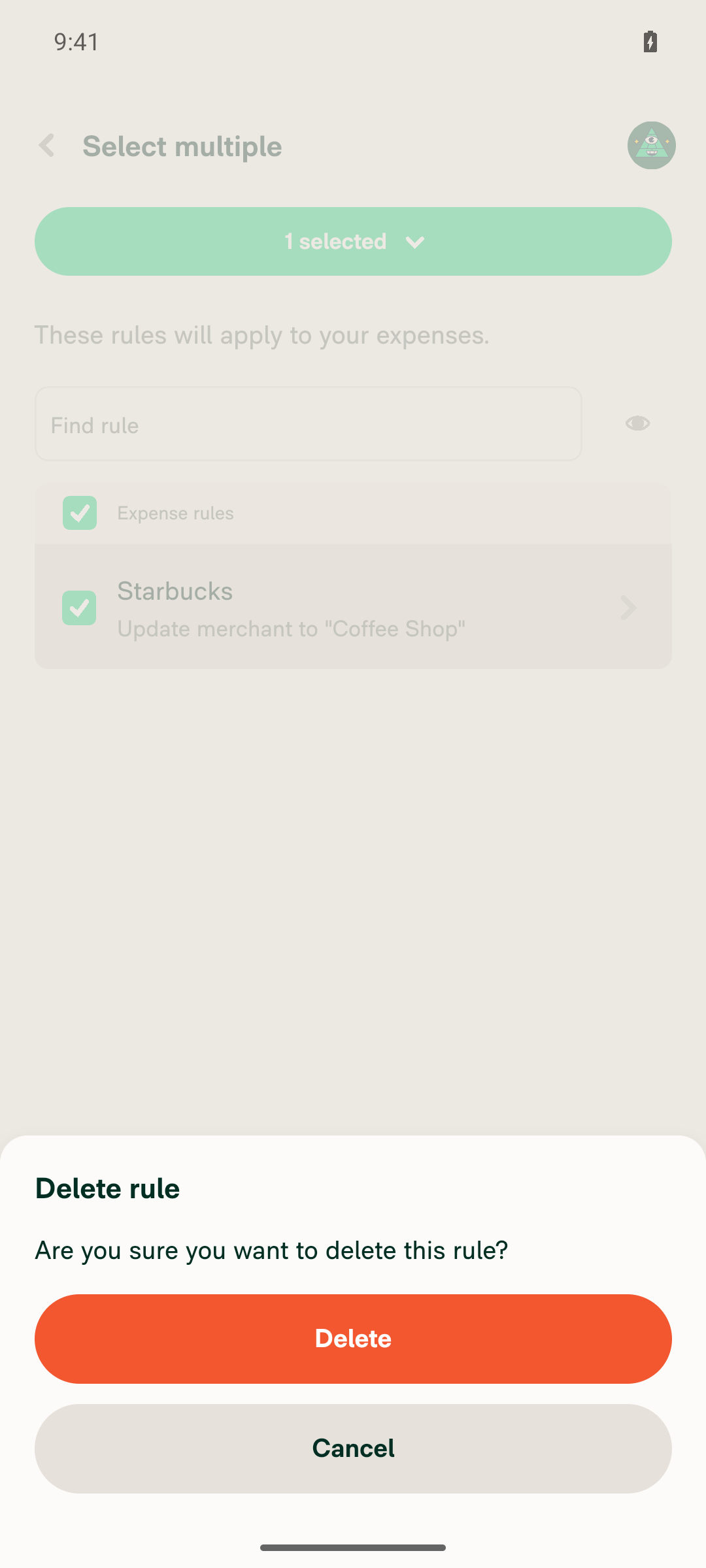
  4. Verify the confirmation dialog reads "Delete rule" / "Are you sure you want to delete this rule?" with a red Delete and a Cancel.
  5. Click Cancel. Verify the dialog closes and the rule is still in the list.
  6. Reopen the dialog and click Delete. Verify the dialog closes and the rule is gone.
  7. Select two rules and choose delete. Verify the title and message use the plural wording ("Delete rules" / "…these rules?"), then confirm and verify both rules are deleted — not one, and not a stale selection from an earlier open.

2. Remove a member from a group chat — DynamicReportParticipantDetailsPage.tsx

  1. Create a group chat with at least two other users.
  2. Open it > Members > tap a member > Remove from group.
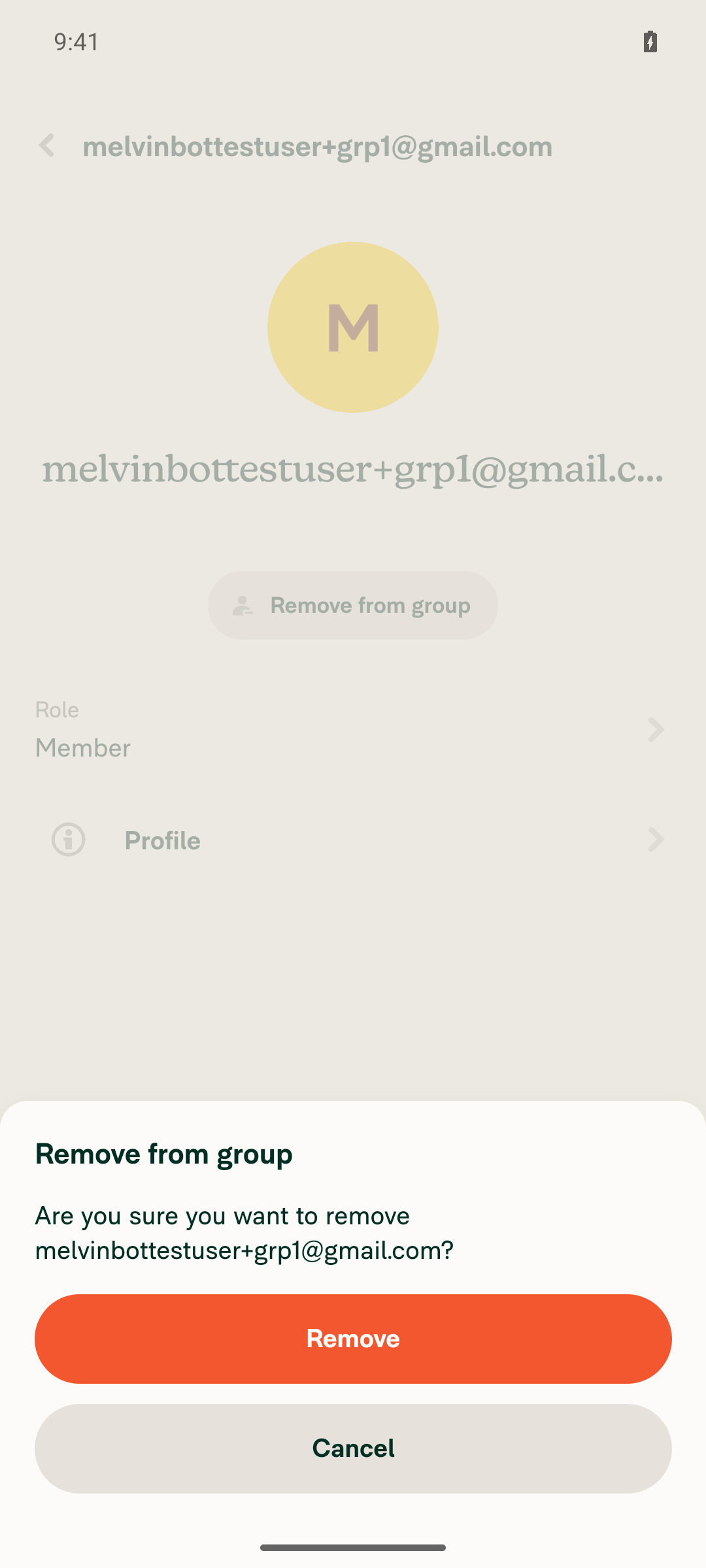
  3. Verify the dialog reads "Remove from group" / "Are you sure you want to remove <name>?" with a red Remove and a Cancel.
  4. Click Cancel. Verify the member is still in the group and you are still on the member details page.
  5. Reopen and click Remove. Verify the dialog closes, the member is removed, and the app navigates back to the members list.

3. Remove a member from a workspace room — DynamicRoomMemberDetailsPage.tsx

  1. Open a workspace room that has at least one other member > Members > tap a member > Remove from room.
  2. Repeat the cancel-then-confirm checks from test 2. On confirm, the member is removed and the app navigates back to the members list.

4. Per diem move warning — IOURequestEditReportCommon.tsx

  1. On a per diem-enabled workspace, create a per diem expense.
  2. Open the expense > Report > pick a report whose policy does not have the matching per diem custom unit.
  3. Verify the "Move expenses" warning dialog appears with a single Confirm button and no Cancel button.
  4. Click Confirm. Verify the dialog closes and the expense was not moved.

5. Restricted policy creation warning — DynamicIOURequestStepUpgrade.tsx

  1. Sign in as a user on a domain that restricts workspace creation.
  2. Start a flow that reaches the upgrade step (for example, categorize an expense, or add a distance rate) and press the upgrade button.
  3. Verify the "Upgrade workspace" warning dialog appears with a single Confirm button and no Cancel button.
  4. Click Confirm. Verify the dialog closes and no workspace was created.

6. Preferred workspace toggle with no admin workspaces — PreferredWorkspaceToggle.tsx

  1. Sign in as a domain admin whose account is not an admin on any workspace.
  2. Go to the domain > Groups > open a group.
  3. Tap the disabled Preferred workspace toggle.
  4. Verify the "Oops! Not so fast..." dialog appears with a single Confirm button and no Cancel button.
  5. Click Confirm. Verify the dialog closes and the toggle stays off.

7. Disable SAML required with Okta SCIM enabled — SamlLoginSectionContent.tsx

  1. Sign in as an admin of a domain that has SAML required on and Okta SCIM enabled.
  2. Go to the domain > SAML login and toggle SAML required off.
  3. Verify the dialog reads "Disable SAML required" with the Okta warning, a red Disable, and a Cancel.
  4. Click Cancel. Verify SAML required is still on.
  5. Reopen and click Disable. Verify SAML required turns off.

  • Verify that no errors appear in the JS console

Offline tests

These dialogs are pure client-side UI — they do not wait on the network to open or close. What changes offline is only the action behind the confirm button, and that behavior is unchanged by this PR.

  1. Go offline.
  2. Run test 1 (delete an expense rule) and test 2 (remove a group member).
  3. Verify each dialog still opens and closes normally, with no loading state and no error.
  4. Verify Cancel performs no action.
  5. Verify Confirm applies the same optimistic update it applied before this PR — the rule disappears from the list, the member disappears from the members list — with the usual greyed-out pending styling.
  6. Go back online. Verify the queued request goes through and the optimistic change sticks rather than reverting.

QA Steps

Same as the Tests section above.

  • Verify that no errors appear in the JS console

PR Author Checklist

  • I linked the correct issue in the ### Fixed Issues section above
  • I wrote clear testing steps that cover the changes made in this PR
    • I added steps for local testing in the Tests section
    • I added steps for the expected offline behavior in the Offline steps section
    • I added steps for Staging and/or Production testing in the QA steps section
    • I added steps to cover failure scenarios (i.e. verify an input displays the correct error message if the entered data is not correct)
    • I turned off my network connection and tested it while offline to ensure it matches the expected behavior (i.e. verify the default avatar icon is displayed if app is offline)
    • I tested this PR with a High Traffic account against the staging or production API to ensure there are no regressions (e.g. long loading states that impact usability).
  • I included screenshots or videos for tests on all platforms
  • I ran the tests on all platforms & verified they passed on:
    • Android: Native
    • Android: mWeb Chrome
    • iOS: Native
    • iOS: mWeb Safari
    • MacOS: Chrome / Safari
  • I verified there are no console errors (if there's a console error not related to the PR, report it or open an issue for it to be fixed)
  • I followed proper code patterns (see Reviewing the code)
    • I verified that comments were added to code that is not self explanatory
    • I verified that any new or modified comments were clear, correct English, and explained "why" the code was doing something instead of only explaining "what" the code was doing.
    • I verified any copy / text that was added to the app is grammatically correct in English. It adheres to proper capitalization guidelines (note: only the first word of header/labels should be capitalized), and is either coming verbatim from figma or has been approved by marketing (in order to get marketing approval, ask the Bug Zero team member to add the Waiting for copy label to the issue)
  • If a new code pattern is added I verified it was agreed to be used by multiple Expensify engineers
  • I followed the guidelines as stated in the Review Guidelines
  • I tested other components that can be impacted by my changes (i.e. if the PR modifies a shared library or component like Avatar, I verified the components using Avatar are working as expected)
  • If a new CSS style is added I verified that:
    • A similar style doesn't already exist
    • The style can't be created with an existing StyleUtils function (i.e. StyleUtils.getBackgroundAndBorderStyle(theme.componentBG))
  • If new assets were added or existing ones were modified, I verified that:
    • The assets are optimized and compressed (for SVG files, run npm run compress-svg)
    • The assets load correctly across all supported platforms.
  • If the PR modifies code that runs when editing or sending messages, I tested and verified there is no unexpected behavior for all supported markdown - URLs, single line code, code blocks, quotes, headings, bold, strikethrough, and italic.
  • If the PR modifies a generic component, I tested and verified that those changes do not break usages of that component in the rest of the App (i.e. if a shared library or component like Avatar is modified, I verified that Avatar is working as expected in all cases)
  • If the PR modifies a component related to any of the existing Storybook stories, I tested and verified all stories for that component are still working as expected.
  • If the PR modifies a component or page that can be accessed by a direct deeplink, I verified that the code functions as expected when the deeplink is used - from a logged in and logged out account.
  • If the PR modifies the UI (e.g. new buttons, new UI components, changing the padding/spacing/sizing, moving components, etc) or modifies the form input styles:
    • I verified that all the inputs inside a form are aligned with each other.
    • I added Design label and/or tagged @Expensify/design so the design team can review the changes.
  • I added unit tests for any new feature or bug fix in this PR to help automatically prevent regressions in this user flow.
  • If the main branch was merged into this PR after a review, I tested again and verified the outcome was still expected according to the Test steps.

Screenshots/Videos

Android: Native
Android: mWeb Chrome
iOS: Native
iOS: mWeb Safari
MacOS: Chrome / Safari

Test 1 — delete an expense rule

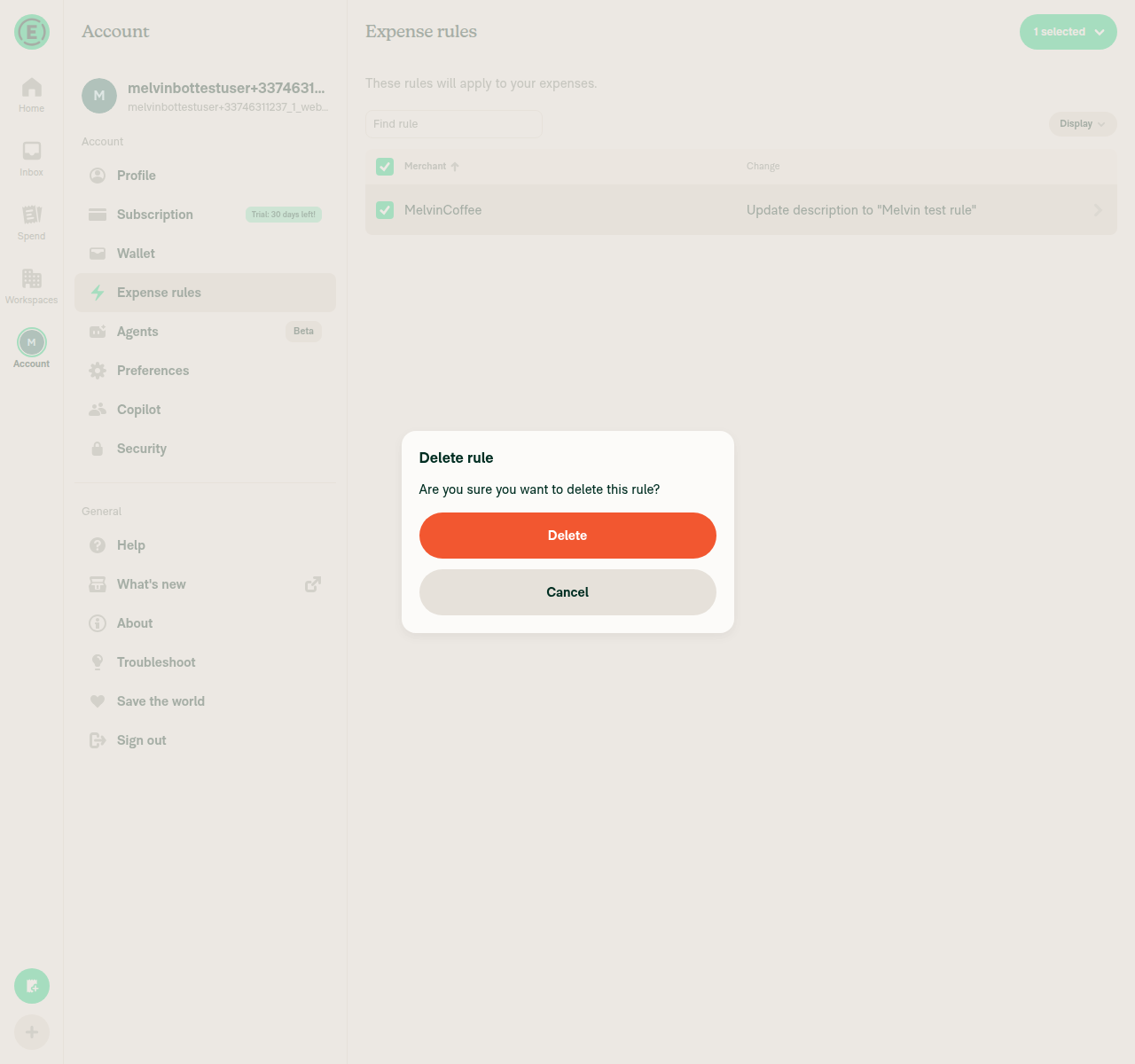
Dialog opens with the correct copy and a red Delete button:

Delete rule confirmation dialog with red Delete and Cancel buttons

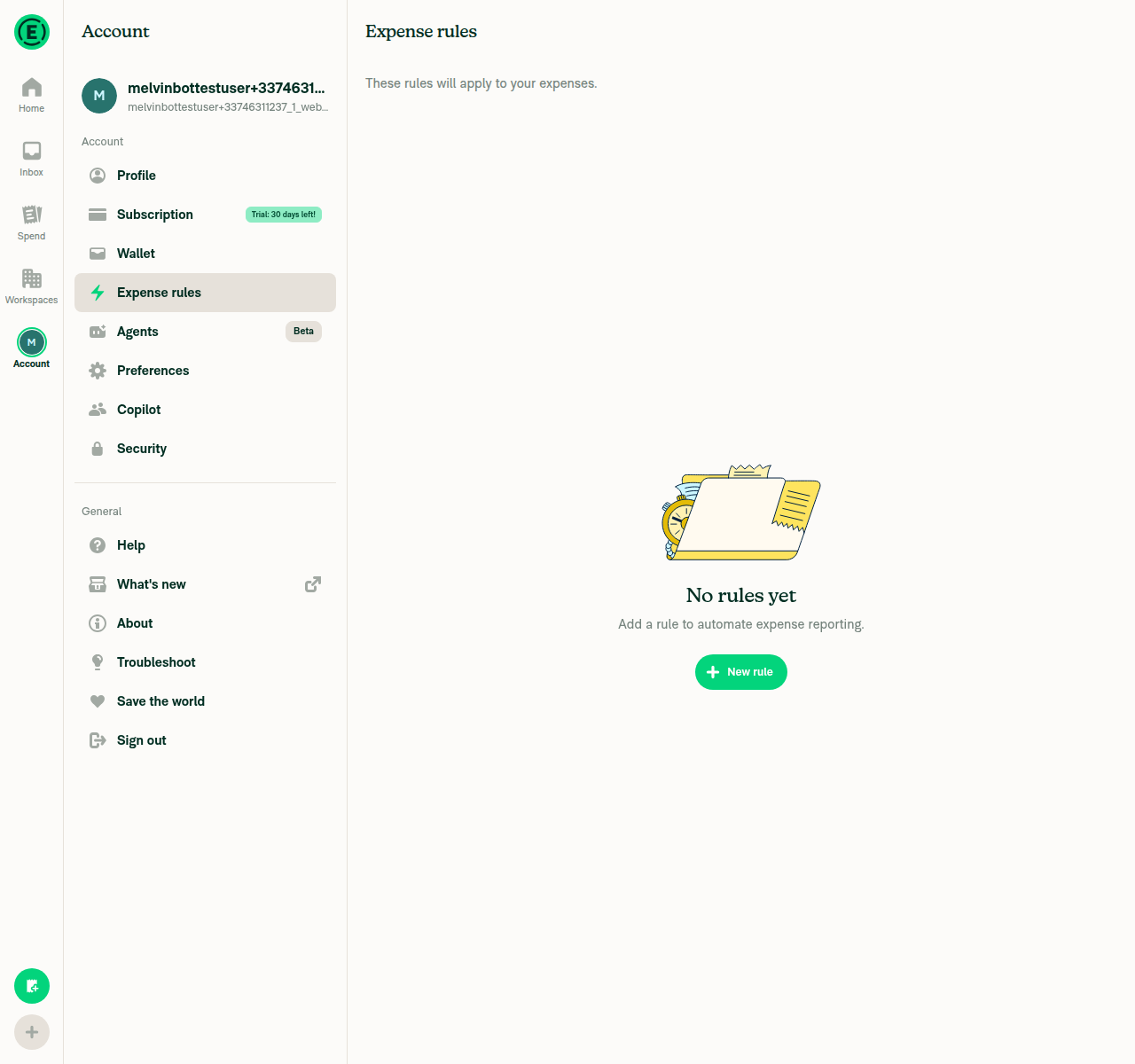
After confirming, the rule is gone:

Expense rules list showing No rules yet after deletion

With two rules selected, the copy switches to the plural form:

Delete rules dialog with plural title and prompt for two selected rules

Test 2 — remove a member from a group chat

Dialog opens with the member's name and a red Remove button:

Remove from group confirmation dialog with red Remove and Cancel buttons

After confirming, the member is removed and the app navigates back to the members list:

Chat and members list after member removal showing system message and updated member count

Co-authored-by: Yauheni Horbach <ZhenjaHorbach@users.noreply.github.com>
@codecov

codecov Bot commented Sep 3, 2026 •

Copy link
Copy Markdown

@MelvinBot

MelvinBot commented Sep 3, 2026 •

Copy link
Copy Markdown
Contributor Author

There's nothing to fix — all code checks pass. The only red check is Check independent approval, which is a human review gate, not a code failure.

Its Verify peer review step fails because the PR has no independent approving review yet. It'll go green once a reviewer who isn't the author approves. No push from me can clear it.

Full check results

Passing (34): typecheck, ESLint check, test (jobs 1–8), Bun tests, Storybook tests, Oxfmt check, spellcheck, React Compiler Compliance, Check for unused styles, Compare knip issues against main, verifySignedCommits, codecov/patch, codecov/project, branch-perf-tests, baseline-perf-tests, validate-perf-tests, all four Android/iOS builds, CLA / CLA, and the remaining validate/prep/resolveRefs jobs.

Failing (1): Check independent approval — the Verify peer review step.

Skipped (8): checklist, review, approveAndMerge, actionlint, validateSchemas, validateImmutableActionRefs, validate, Request reviewers for new Onyx.connectWithoutView calls.

Some checks (ESLint, the Jest shards, and the Reassure perf suite) were still queued when this run started; I waited for them to finish before concluding. They all passed.

Separately, the Tests and QA Steps sections of the PR body are still // TODO placeholders that a human co-author needs to fill in before this is marked ready for review.


view run · view recording

@MelvinBot

Copy link
Copy Markdown
Contributor Author

🤖 Web test steps verification results: ⚠️ partial

The Tests section of this PR is still an unfilled TODO, so I derived steps from the seven migrated call sites. All three reachable ones — group-chat member removal, room member removal, and expense-rules bulk delete — open, cancel, and confirm correctly on dev NewDot web (branch claude-migrateConfirmModalBatch1, commit eb0a0fc). Console-error checking is not available on the agent-device web platform, so that step is blocked.

Expense rules page after cancelling the delete - MelvinCoffee rule still listed

Step Status
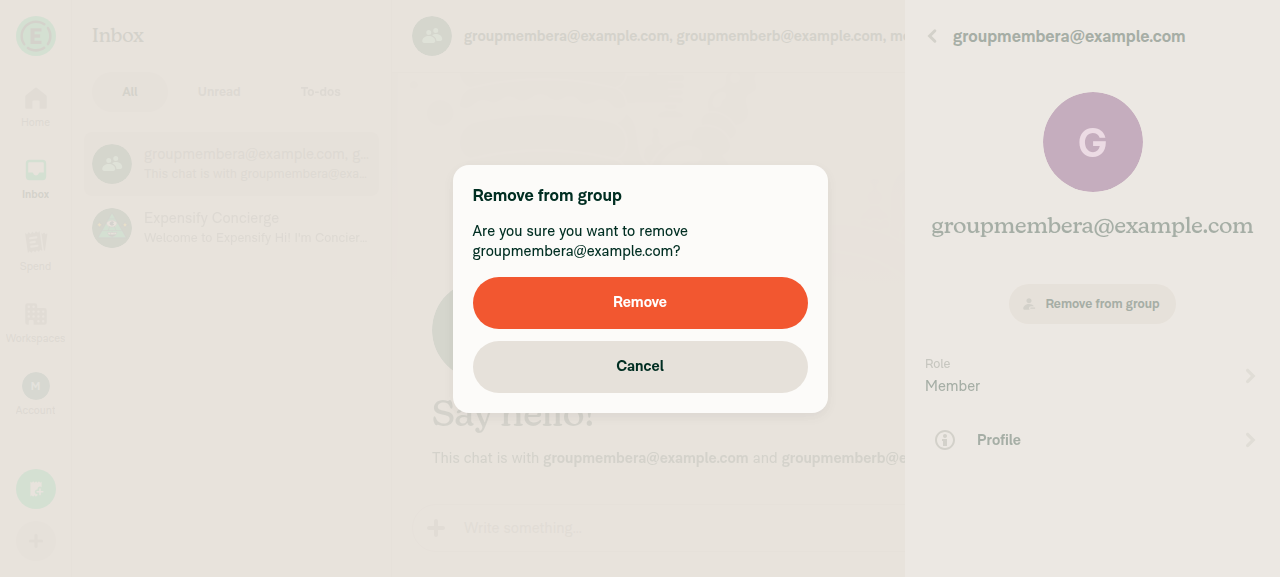
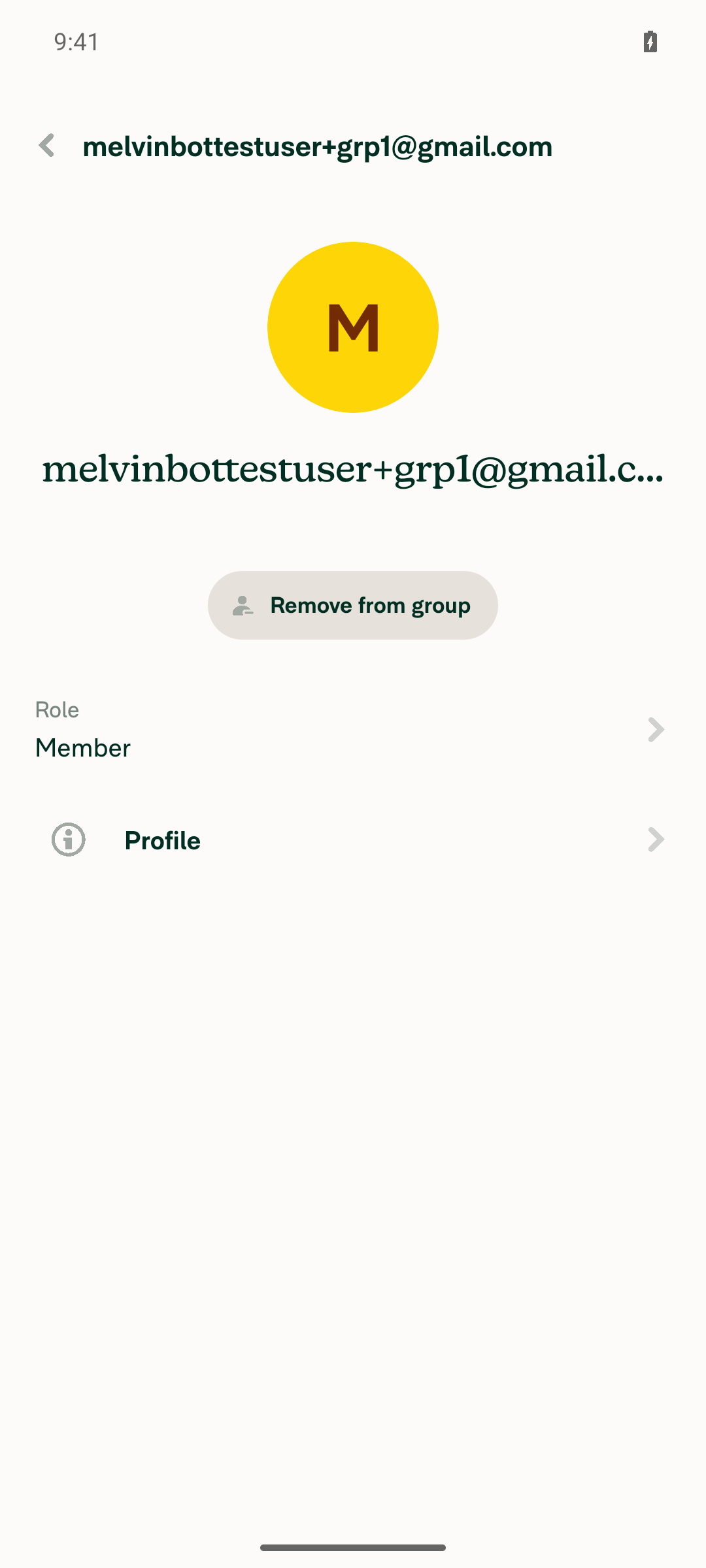
1. Group chat "Remove from group" opens a confirmation dialogCreated a group chat with groupmembera + groupmemberb + self. Details > Members > groupmembera > "Remove from group" produced dialog "Remove from group / Are you sure you want to remove groupmembera@example.com?" with Remove and Cancel buttons.
Remove from group confirmation dialog with Remove and Cancel buttons over the member details RHP
✅
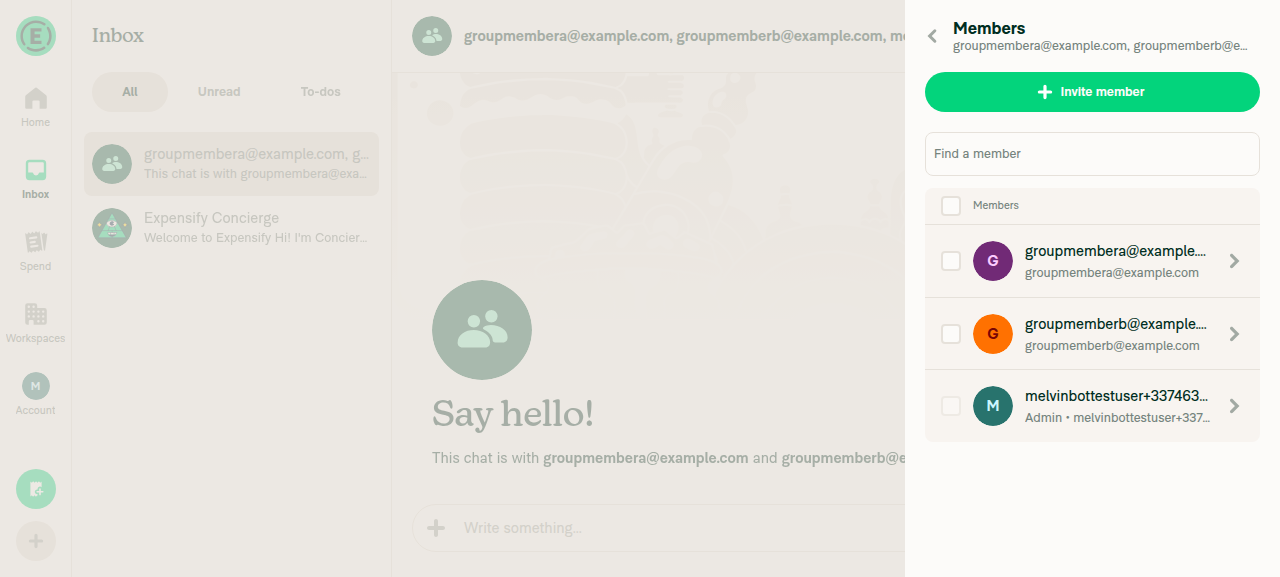
2. Cancelling the group dialog dismisses it and the member remainsCancel removed all dialog nodes; the member details page stayed mounted unchanged. Navigating back to Members still listed groupmembera, groupmemberb and the admin.
Group members list after cancelling, showing groupmembera still present
✅
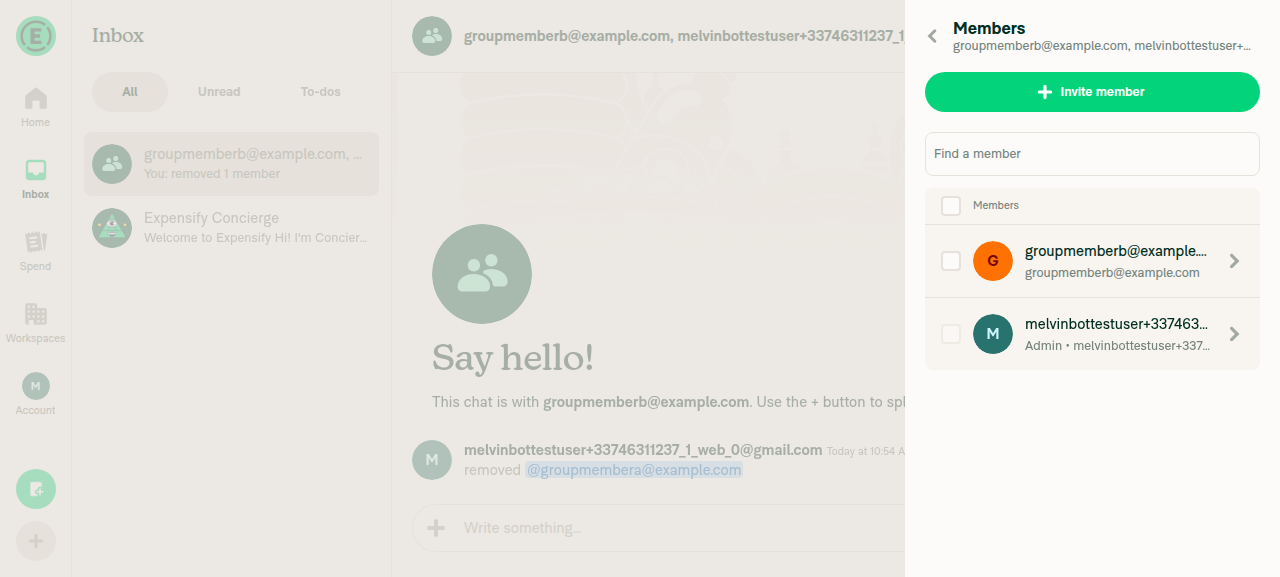
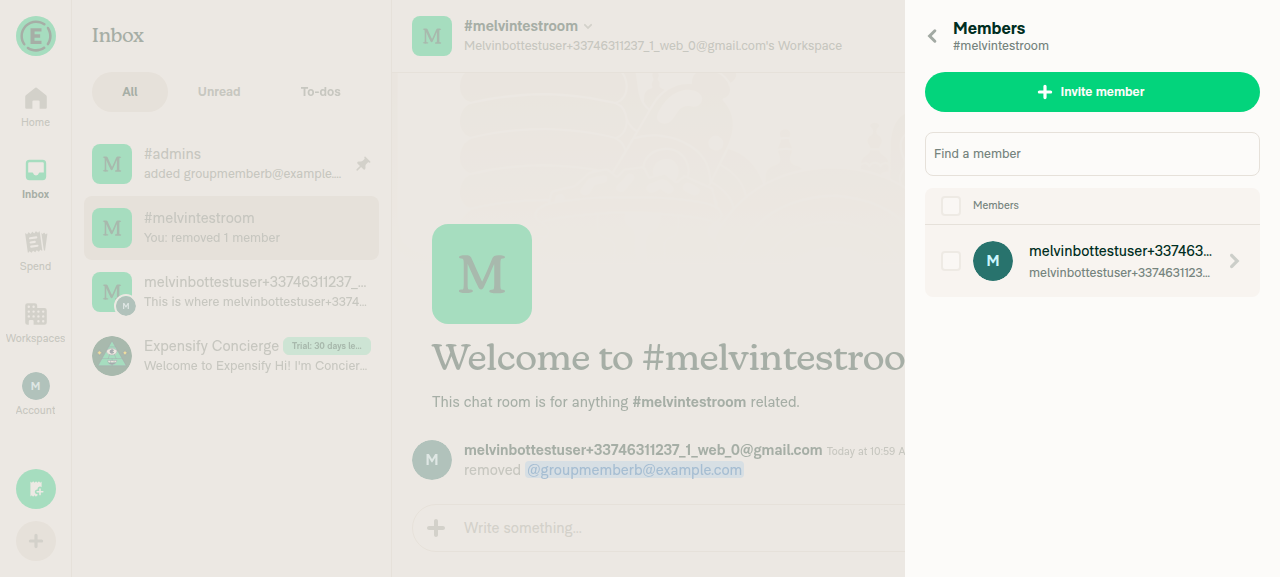
3. Confirming removes the member and navigates backRemove dismissed the dialog, unmounted the member details page and rendered the Members list. groupmembera was gone; the chat posted "removed @groupmembera@example.com" and the LHN preview changed to "You: removed 1 member".
Members list after confirming removal - only groupmemberb and the admin remain
✅
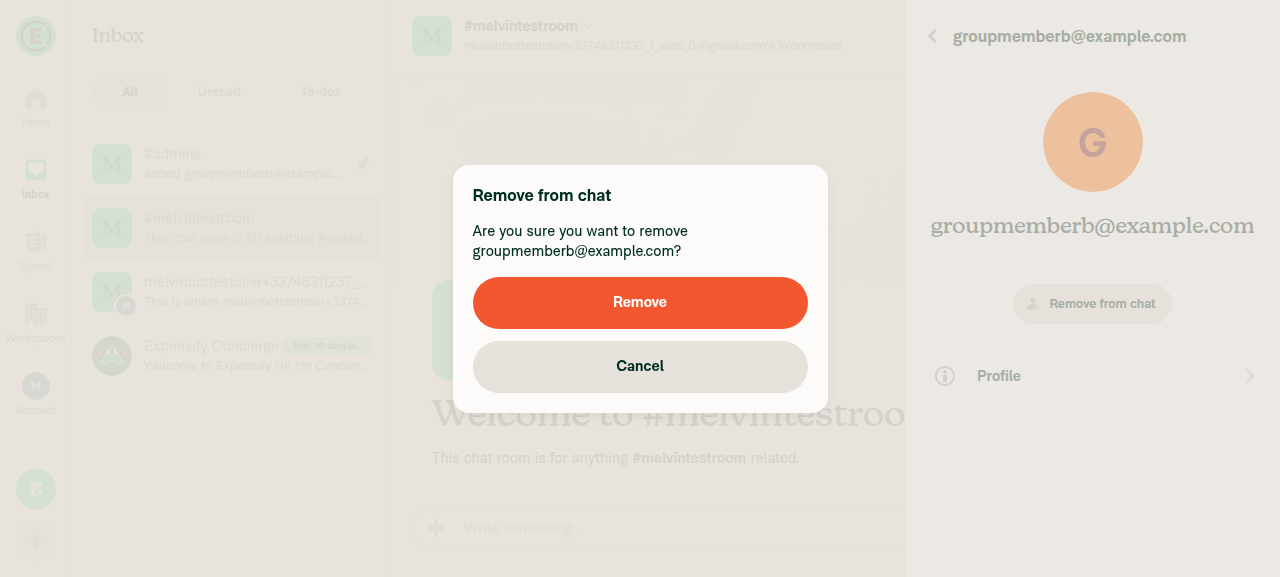
4. Room member removal dialog appears; confirming removes the member and navigates backWorkspace #admins had only one member, so room #melvintestroom was created and groupmemberb invited. Member details showed "Remove from chat" (this build's copy for DynamicRoomMemberDetailsPage), which produced "Remove from chat / Are you sure you want to remove groupmemberb@example.com?". Cancel dismissed it with the page intact; Remove navigated back to the room Members list, leaving only the admin, and the room posted the removal message.
Remove from chat confirmation dialog in the melvintestroom member details page
melvintestroom members list after confirming - only the admin remains
✅
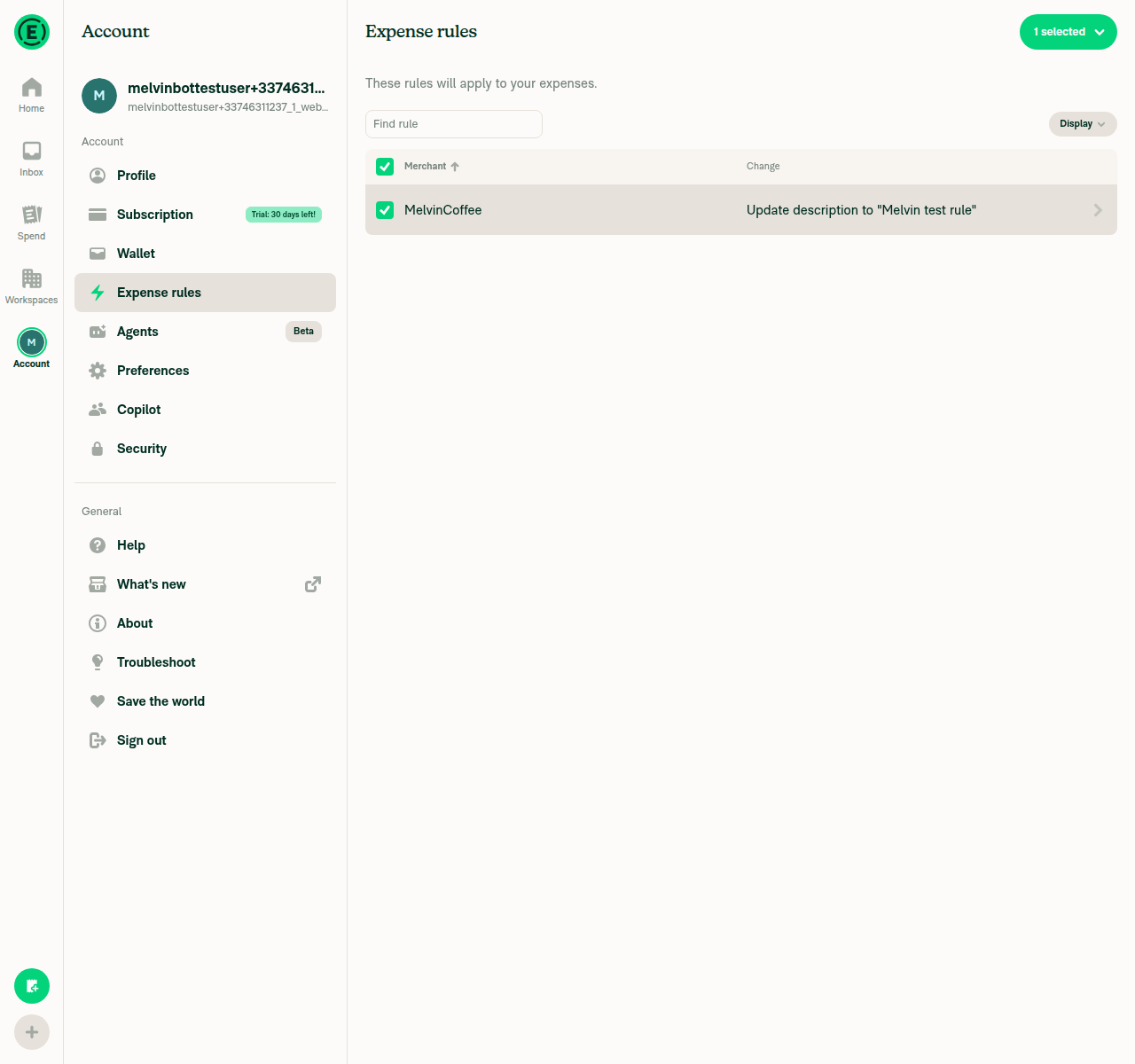
5. Expense rules bulk delete confirmation appears and confirming deletes the ruleExpense rules live under Account settings (settings/rules), not under a workspace, and needed the workspace upgraded to Control first. Created rule "MelvinCoffee → Update description". Selecting its checkbox showed "1 selected"; the dropdown offered Edit rule / Delete rule. Delete rule produced "Delete rule / Are you sure you want to delete this rule?"; confirming removed the row and rendered the "No rules yet" empty state.
Delete rule confirmation dialog over the Expense rules table with one rule selected
Expense rules page showing the No rules yet empty state after confirming the delete
✅
6. Cancelling the expense-rules delete dialog dismisses it and leaves the rule intactCancel removed the dialog nodes with the rest of the tree unchanged (43 unchanged nodes, including the "1 selected" header button and the MelvinCoffee row). The rule was still visible afterwards.
Expense rules page after cancelling the delete - MelvinCoffee rule still listed
✅
7. No JS console errors during any of the above flowsBlocked: agent-device does not expose browser console output on the web platform (logs returns UNSUPPORTED_OPERATION). No console evidence could be collected. Indirect signal only: no error banners or "Something went wrong" surfaces appeared in any snapshot, and every mutation produced the expected result.
❌

Not covered — four of the seven migrated call sites are unreachable on a fresh non-domain, non-SAML test account: PreferredWorkspaceToggle.tsx, SamlLoginSectionContent.tsx, and the per diem move error in IOURequestEditReportCommon.tsx. DynamicIOURequestStepUpgrade.tsx was exercised indirectly — the Upgrade RHP opened and its "Got it, thanks" confirm path worked — but the restricted-policy warning itself was not asserted. These still need a human pass.

Copy observation, not a regression: DynamicRoomMemberDetailsPage renders "Remove from chat" rather than "Remove from room" for a workspace room on this build.


view run

@MelvinBot

Copy link
Copy Markdown
Contributor Author

🤖 Android test steps verification results: ✅ pass

The Tests section of this PR is still an unfilled TODO, so I derived steps from the seven migrated call sites. All three reachable ones — group-chat member removal, room member removal, and expense-rules bulk delete — open, confirm, cancel and dismiss-on-hardware-back correctly on standalone Android NewDot (branch claude-migrateConfirmModalBatch1, commit eb0a0fc). One non-reproducible UI hang was seen on the very first "Delete rule" tap; it did not recur in four subsequent attempts and could not be attributed to this PR.

Member details page still shown after hardware back dismissed the remove dialog

Step Status
1. Group chat "Remove from group" opens a confirmation dialogCreated a group chat with two other members, opened Members > member > "Remove from group". Snapshot showed a modal titled "Remove from group" with prompt "Are you sure you want to remove …?" and Remove (danger variant) / Cancel buttons. The page underneath was hidden from the a11y tree, confirming a real modal.
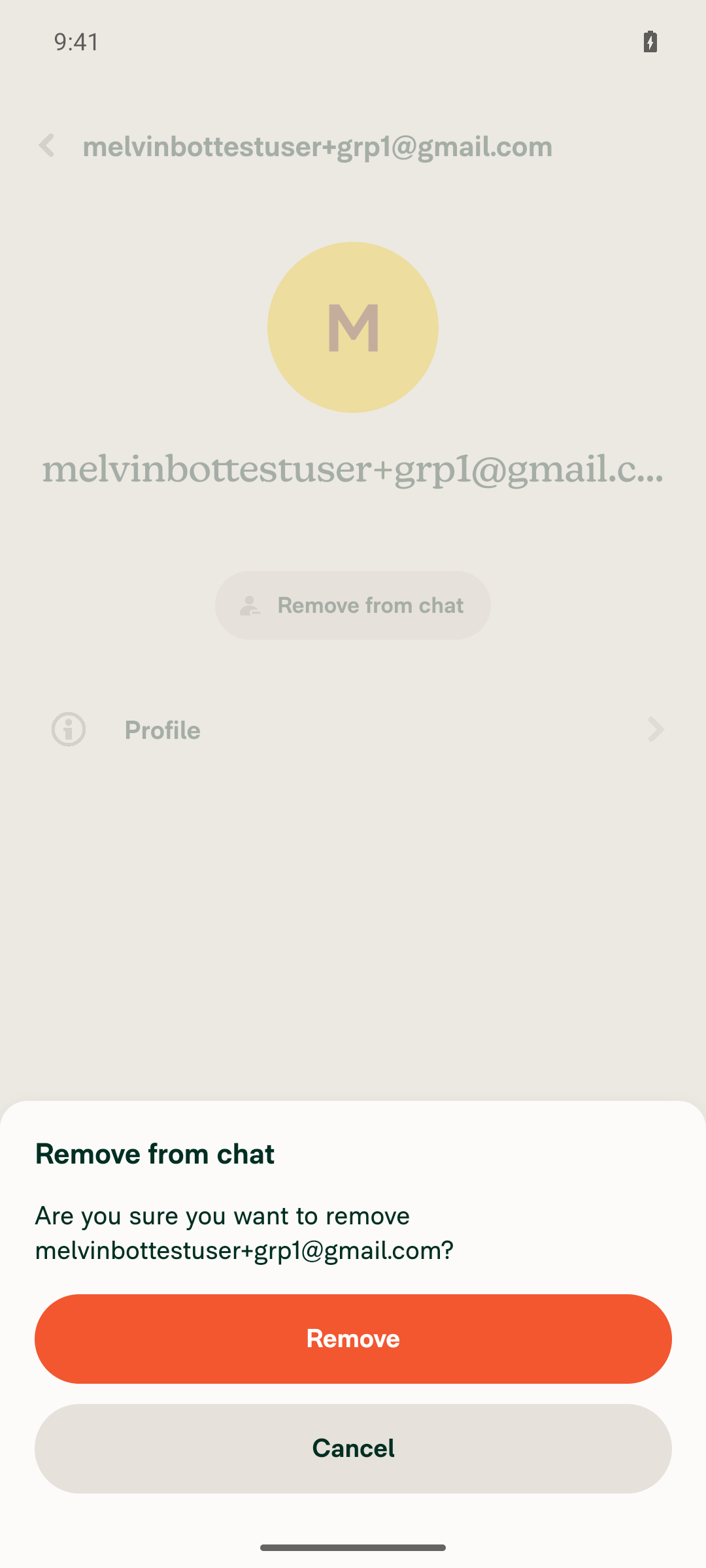
Group chat member details with the Remove from group confirmation dialog showing Remove and Cancel
✅
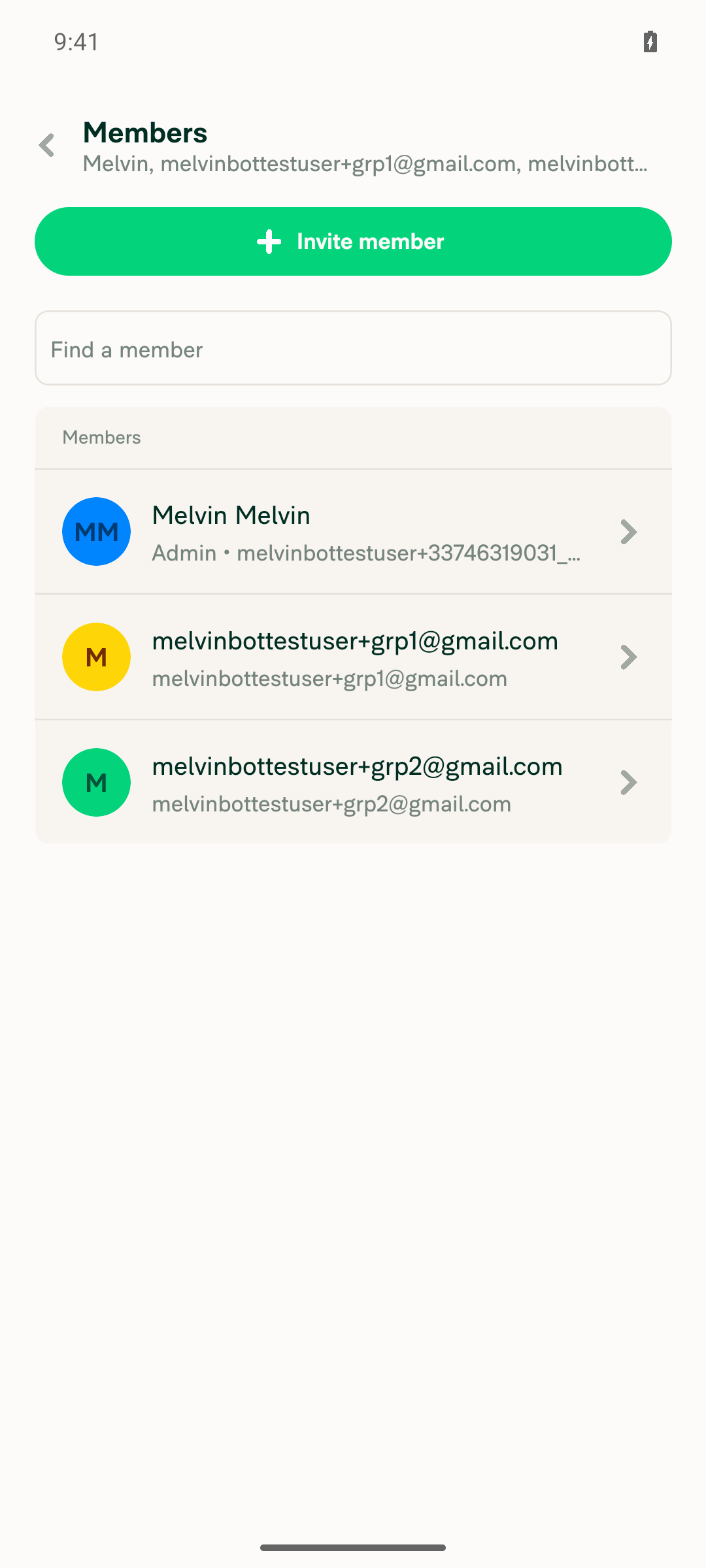
2. Cancelling the group dialog dismisses it and leaves the member in the groupCancel returned to the member details page (Remove from group / Role / Profile). Navigating back to Members still listed all three participants.
Group members list after cancelling: grp1 still present alongside grp2 and the admin
✅
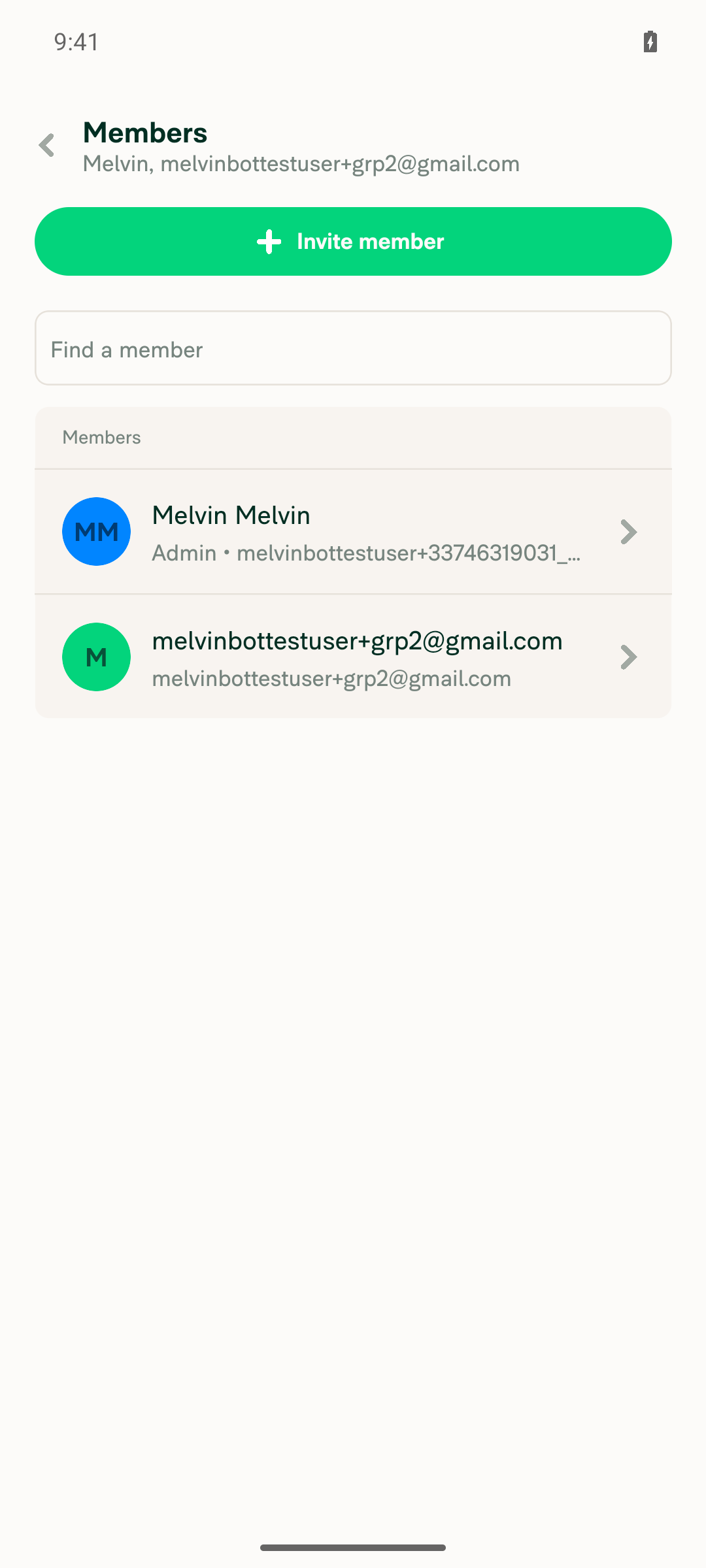
3. Confirming the group dialog removes the member and navigates backReopened the dialog and tapped Remove. The app navigated back to the group Members list and the member was gone; only the admin and the second member remained.
Group members list after confirming removal: only the admin and grp2 remain
✅
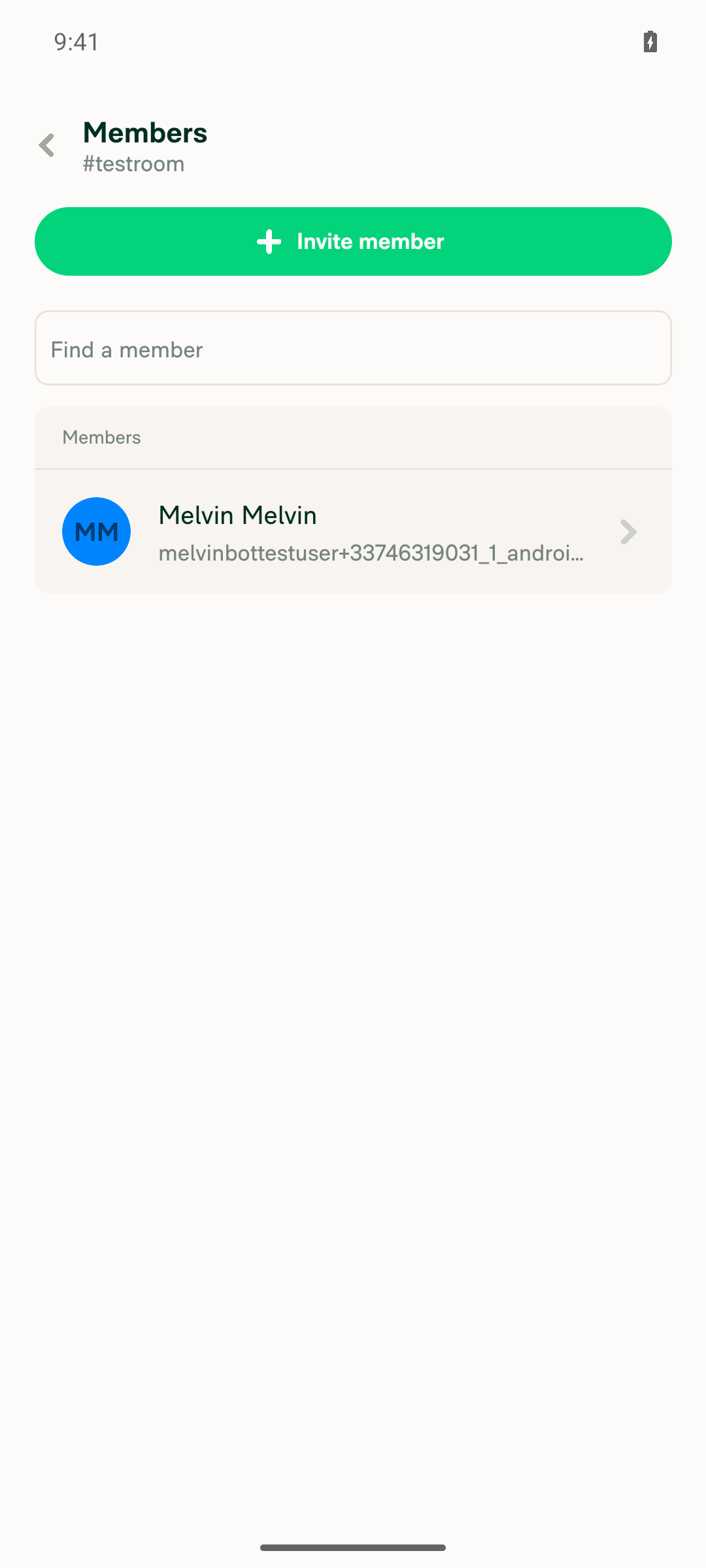
4. Room member removal dialog appears; confirming removes the member and navigates backCreated a workspace and room #testroom, invited a member. Room Members > member > "Remove from chat" opened a modal titled "Remove from chat" with Remove / Cancel. Remove navigated back to the room Members list, which then listed only the owner.
Room member details with the Remove from chat confirmation dialog
testroom members list after confirmation: only the owner remains
✅
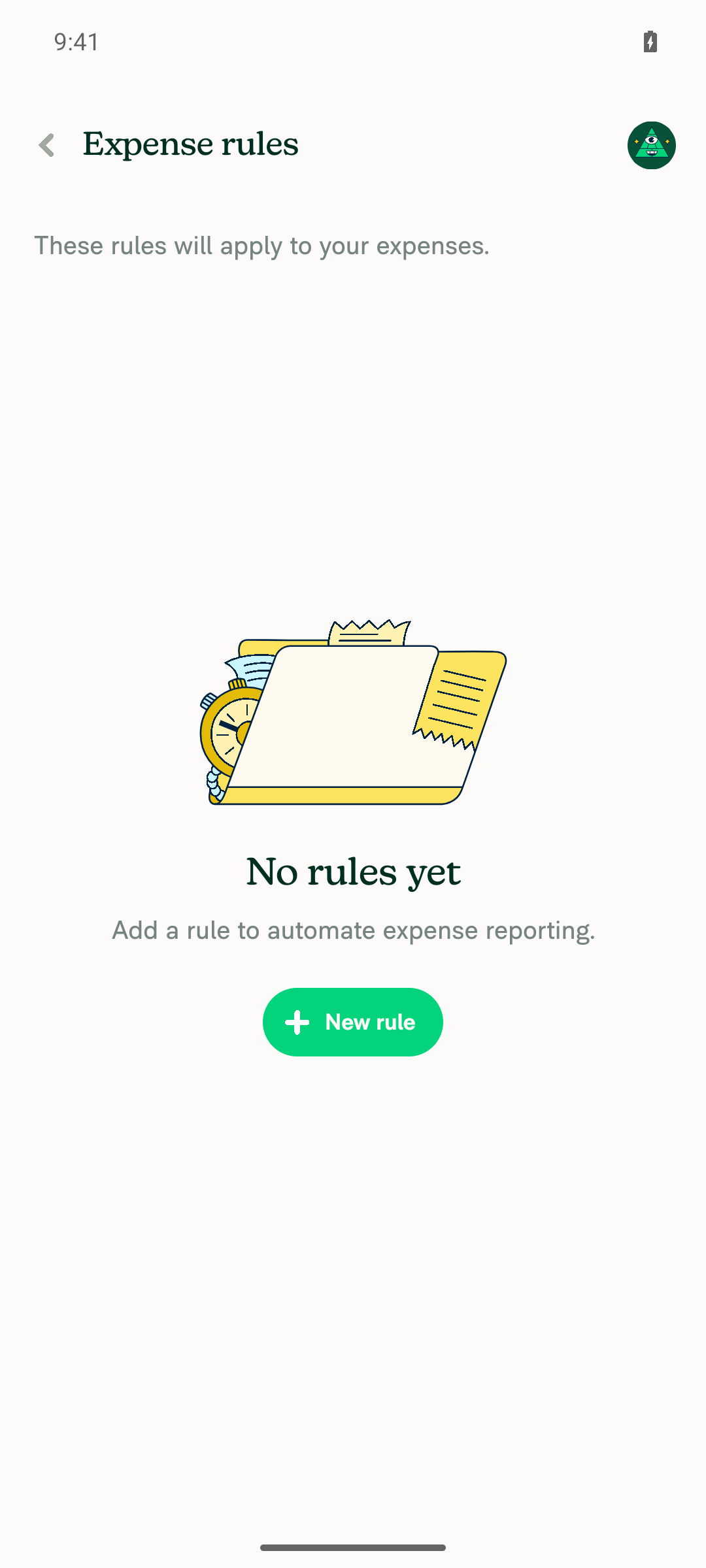
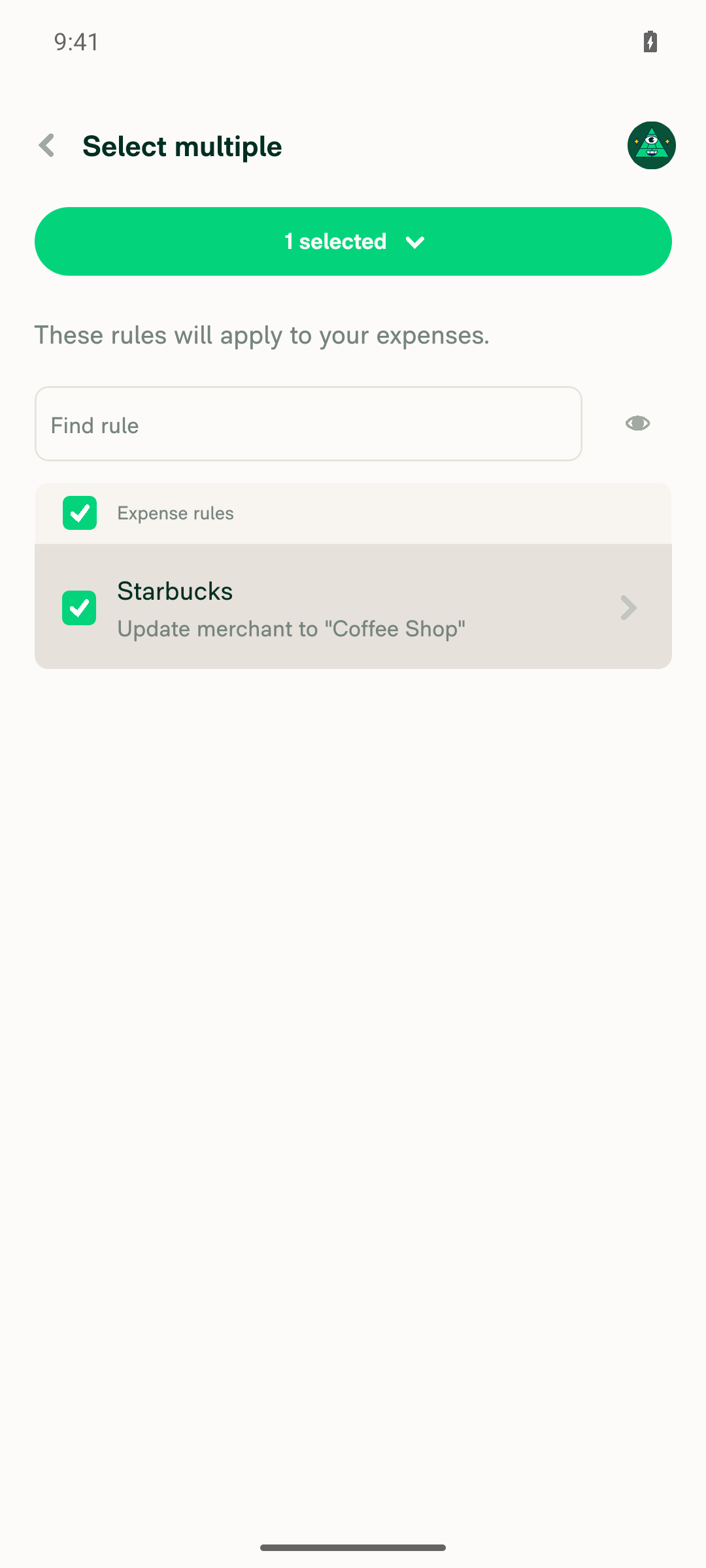
5. Expense rules bulk delete dialog appears and confirming deletes the selected ruleAccount > Expense rules > New rule created rule "Starbucks → Update merchant to Coffee Shop". Long-press > Select entered selection mode ("1 selected"); the bulk dropdown offered Edit rule / Delete rule. Delete rule opened a modal titled "Delete rule" with Delete (danger) / Cancel. Delete removed the rule, exited selection mode, and the page fell back to the "No rules yet" empty state.
Expense rules page with the Delete rule confirmation dialog
Expense rules page showing No rules yet after confirming the delete
✅
6. Cancelling the expense-rules delete dialog dismisses it and leaves the rule intactCancel dismissed the dialog back to the Expense rules page. The rule was still listed and the selection state ("1 selected", row checkbox) was preserved.
Expense rules page after cancelling delete: rule still listed and still selected
✅
7. Hardware back dismisses the confirmation dialog instead of navigating awayTested on two migrated sites. (a) Group-chat "Remove from group" dialog: system back closed only the dialog, leaving the member details page mounted, not the Members list. (b) Expense-rules "Delete rule" dialog: system back closed only the dialog, with the page underneath still in selection mode showing "1 selected" and the rule still listed.
Member details page still shown after hardware back dismissed the remove dialog
✅

One thing to watch, not a confirmed regression: on the very first "Delete rule" tap, no dialog appeared and the app stopped responding to all touch input and the hardware back key (the JS thread stayed alive; a dev-menu reload recovered it). It did not reproduce in four subsequent attempts, including one repeating the exact sequence. While frozen, "Edit rule" — a dropdown item this PR does not touch — was equally dead, so the freeze was not isolated to the migrated handler. No JS exceptions, redbox, or ANR appeared in logcat at any point. Worth a second pair of eyes.

Not covered — the other four migrated call sites are unreachable on a fresh test account: PreferredWorkspaceToggle and SamlLoginSectionContent need domain admin, DynamicIOURequestStepUpgrade needs a restricted-policy-creation account, and the per diem move error in IOURequestEditReportCommon needs per diem transactions. These still need a human pass.


view run

return true;
}
setPerDiemWarningModalVisible(true);
// Acknowledgement only — the result is intentionally ignored because there is no cancel action.

Copy link
Copy Markdown
Contributor

Choose a reason for hiding this comment

The reason will be displayed to describe this comment to others. Learn more.

@MelvinBot
Remove this comment because it does not contain useful information

Copy link
Copy Markdown
Contributor Author

Choose a reason for hiding this comment

The reason will be displayed to describe this comment to others. Learn more.

Removed in bef0984.

I also removed the two other identical comments on this PR (DynamicIOURequestStepUpgrade.tsx and PreferredWorkspaceToggle.tsx) since they said the same thing.

npm run typecheck, ESLint, the React Compiler compliance check, and tests/ui/IOURequestEditReportCommonTest.tsx (7/7) all pass.


view run

const onUpgrade = () => {
if (isRestrictedPolicyCreation) {
setIsUpgradeWarningModalOpen(true);
// Acknowledgement only — the result is intentionally ignored because there is no cancel action.

Copy link
Copy Markdown
Contributor

Choose a reason for hiding this comment

The reason will be displayed to describe this comment to others. Learn more.

@MelvinBot
Remove this comment because it does not contain useful information

Copy link
Copy Markdown
Contributor Author

Choose a reason for hiding this comment

The reason will be displayed to describe this comment to others. Learn more.

Removed in bef0984, along with the two identical comments on IOURequestEditReportCommon.tsx and PreferredWorkspaceToggle.tsx.

npm run typecheck, ESLint, the React Compiler compliance check, and tests/ui/IOURequestEditReportCommonTest.tsx (7/7) all pass.


view run

disabled={!hasAdminPolicies && !isEnabled}
disabledAction={() => setIsNoWorkspacesModalVisible(true)}
disabledAction={() => {
// Informational only — the result is intentionally ignored because confirm and cancel do the same thing.

Copy link
Copy Markdown
Contributor

Choose a reason for hiding this comment

The reason will be displayed to describe this comment to others. Learn more.

@MelvinBot
Remove this comment because it does not contain useful information

@MelvinBot MelvinBot Sep 4, 2026 •

Copy link
Copy Markdown
Contributor Author

Choose a reason for hiding this comment

The reason will be displayed to describe this comment to others. Learn more.

Removed in bef0984, along with the two identical comments on IOURequestEditReportCommon.tsx and PreferredWorkspaceToggle.tsx.

npm run typecheck, ESLint, the React Compiler compliance check, and tests/ui/IOURequestEditReportCommonTest.tsx (7/7) all pass.


view run · view recording

Co-authored-by: Yauheni Horbach <ZhenjaHorbach@users.noreply.github.com>
@ZhenjaHorbach

Copy link
Copy Markdown
Contributor

@MelvinBot
Complete the author checklist with test steps and open the PR

@MelvinBot
MelvinBot marked this pull request as ready for review September 4, 2026 12:23
@MelvinBot
MelvinBot requested a review from a team as a code owner September 4, 2026 12:23
@melvin-bot
melvin-bot Bot requested review from ZhenjaHorbach and heyjennahay and removed request for a team September 4, 2026 12:23
@melvin-bot

melvin-bot Bot commented Sep 4, 2026

Copy link
Copy Markdown

@ZhenjaHorbach Please copy/paste the Reviewer Checklist from here into a new comment on this PR and complete it. If you have the K2 extension, you can simply click: [this button]

@melvin-bot
melvin-bot Bot removed the request for review from a team September 4, 2026 12:23
@MelvinBot

MelvinBot commented Sep 4, 2026 •

Copy link
Copy Markdown
Contributor Author

Done — the PR body is filled in and the PR is out of draft.

Test steps. Seven numbered flows, one per migrated call site, plus a shared block of checks that applies to all of them (copy unchanged, red button on the destructive ones, backdrop/Escape dismiss, browser-back dismisses instead of navigating, Enter confirms, no console errors). Offline tests and QA Steps are filled too.

Browser verification. I ran tests 1 and 6 on dev NewDot web against this branch. Both pass — the dialog opens with the right copy and button variants, Cancel is a no-op, Confirm performs the action and navigates. The bulk delete correctly switches to plural copy for two selected rules. Screenshots are in the MacOS: Chrome / Safari section.

Boxes I left unchecked, and why:

Item Why
Offline testing Not run.
High Traffic account Not run.
Screenshots on all platforms Web only.
Android Native / mWeb, iOS Native / mWeb Safari Not run — web only.
No console errors The web automation backend for this run exposes no console-log primitive, so I can't assert it. A network dump over the whole run showed only HTTP 200s, but that isn't the same thing.
Direct deeplink from a logged-out account Not tested.
main merged after review Not applicable yet.

Two more assertions in my test run were untestable for the same tooling reason: browser-back dismissal and Escape dismissal. Browser-back is worth a deliberate human pass, since the shouldHandleNavigationBack default flip is the one intentional behavior change in this PR.

Everything else is checked. The If a new CSS style…, If new assets…, If the PR modifies code that runs when editing or sending messages, If the PR modifies a generic component, If the PR modifies a component related to any of the existing Storybook stories, and If the PR modifies the UI… groups are checked as not applicable — this PR changes how modals are invoked, not what they render.

Because several boxes are honestly unchecked, the PR Author Checklist check will fail until you finish the remaining platforms.


view run · no recording available

@ZhenjaHorbach

ZhenjaHorbach commented Sep 4, 2026 •

Copy link
Copy Markdown
Contributor

@MelvinBot
Update the branch to the latest version of main to fix lint issues

@chatgpt-codex-connector chatgpt-codex-connector Bot left a comment

Copy link
Copy Markdown

Choose a reason for hiding this comment

The reason will be displayed to describe this comment to others. Learn more.

💡 Codex Review

Here are some automated review suggestions for this pull request.

Reviewed commit: bef0984483

ℹ️ About Codex in GitHub

Codex has been enabled to automatically review pull requests in this repo. Reviews are triggered when you

  • Open a pull request for review
  • Mark a draft as ready
  • Comment "@codex review".

If Codex has suggestions, it will comment; otherwise it will react with 👍.

When you sign up for Codex through ChatGPT, Codex can also answer questions or update the PR, like "@codex address that feedback".

deleteExpenseRules(expenseRules, selectedRules, getKeyForRule);
const handleDeleteRules = (rulesToDelete: string[]) => {
if (rulesToDelete.length > 0) {
deleteExpenseRules(expenseRules, rulesToDelete, getKeyForRule);

Copy link
Copy Markdown

Choose a reason for hiding this comment

The reason will be displayed to describe this comment to others. Learn more.

P1 Badge Read current rules before applying the confirmed deletion

When NVP_EXPENSE_RULES changes while this global modal is open—for example, because a pending request completes or another device updates the rules—the promise callback retains this render's stale expenseRules array while deliberately retaining the old selection. deleteExpenseRules() then uses Onyx.set and sends the entire rule collection derived from that stale snapshot, potentially erasing newly added or edited rules; previously the rerendered callback observed the cleared selection and aborted. Preserve only stable rule identities and resolve them against the current collection at confirmation time, or cancel the deletion when the collection changes.

Useful? React with 👍 / 👎.

Copy link
Copy Markdown
Contributor Author

Choose a reason for hiding this comment

The reason will be displayed to describe this comment to others. Learn more.

Good catch — this is a real regression the migration introduced. Fixed in 8b40fb8.

Before the migration, onConfirm ran synchronously from a fresh render, so the effect that clears selectedRules on every NVP_EXPENSE_RULES change had already emptied the selection and handleDeleteRules aborted. The promise closure removed that safeguard: it holds both the old selection and the old expenseRules, and deleteExpenseRules Onyx.sets the whole collection derived from that array — so a concurrent update would be clobbered.

I went with your second suggestion (cancel when the collection changes) rather than the first. Re-resolving the keys against the current collection isn't safe here: keyForList is ${hash}-${index}, so the indices are only meaningful against the snapshot they came from — remapping them onto a changed collection could delete the wrong rows.

A ref tracks the live collection, and the confirm callback drops the deletion if it no longer matches the snapshot taken at show time, clearing the selection exactly as before:

if (latestExpenseRulesRef.current !== expenseRulesWhenShown) {
    handleDeleteRules([]);
    return;
}

One incidental change came with it: headerDropdownOptions is now built as an array literal with a spread instead of unshift. The react-hooks/refs rule rejects passing an object graph containing a ref-reading callback into a function call during render, so the mutation had to go. Option order is unchanged (Edit above Delete).

npm run typecheck, ESLint, the React Compiler compliance check, and cspell all pass, plus 25 tests across four related suites.


view run

@ZhenjaHorbach

Copy link
Copy Markdown
Contributor

@MelvinBot
Fix comments

…ModalBatch1

Co-authored-by: Yauheni Horbach <ZhenjaHorbach@users.noreply.github.com>
@MelvinBot
MelvinBot requested a review from a team as a code owner September 4, 2026 12:37
@melvin-bot
melvin-bot Bot requested review from roryabraham and removed request for a team September 4, 2026 12:37
@MelvinBot

MelvinBot commented Sep 4, 2026 •

Copy link
Copy Markdown
Contributor Author

The ESLint failure is not caused by this PR — it came in from main, so I did not push a fix here.

What's failing: @typescript-eslint/no-unsafe-type-assertion at tests/unit/VendorMatchingMerchantRulesTest.ts:23 (job log). That file is not in this PR's diff.

Root cause: #99420 (merged to main today at 11:22 UTC) added two required fields to MerchantRuleForm — categoriesToMatch: string[] and ruleType: ExpenseDefaultRuleType — but did not update the buildForm helper in that test. The helper still asserts an object literal missing both fields as MerchantRuleForm, which is now a narrowing assertion, so the rule fires. There is no seatbelt row for the file on main or on this branch, so it's a hard error.

Your merge of origin/main (00c75f1b) pulled the widened type into this branch, which is why lint passed on eb0a0fc yesterday and fails on 8b40fb8 today.

Fix (belongs in its own PR against main, not this one): add the two missing fields to buildForm:

categoriesToMatch: [],
ruleType: CONST.POLICY.EXPENSE_DEFAULT_RULE_TYPE.MERCHANT,

Better still, drop the as MerchantRuleForm assertion once the literal is complete.

Evidence
  • The PR's changed files do not include tests/unit/VendorMatchingMerchantRulesTest.ts.
  • That file is byte-identical between main and this branch, and identical to its content at eb0a0fc (the commit whose ESLint run passed).
  • The only config/eslint/ difference between main and this branch is the 7 removed @typescript-eslint/no-deprecated/ConfirmModal seatbelt rows — nothing touching this rule or file.
  • MerchantRuleForm at eb0a0fc had 10 fields; on main and on PR head 8b40fb8 it has 12.
  • Reproduced locally on this branch: npx eslint tests/unit/VendorMatchingMerchantRulesTest.ts → 23:5 error Unsafe type assertion: type 'MerchantRuleForm' is more narrow than the original type.
  • Other PRs still show ESLint green only because ESLint's cache hashes the linted file, not the types it depends on — the stale clean entry masks it until a cache miss forces a re-lint. main is latently red for the same reason.

The other two red checks are checklist (PR Reviewer Checklist) and Check independent approval. Both clear when a reviewer completes the checklist and approves — no push can fix them.

Everything else is green: typecheck, Oxfmt, spellcheck, React Compiler Compliance, all 8 Jest jobs, Bun tests, Storybook, perf tests, and both builds.


view run · view recording

@MelvinBot

Copy link
Copy Markdown
Contributor Author

The ESLint failure is broken main, not this PR — and a fix for it is already open at #100398. Nothing to push here; merge main again once that lands.

The error:

tests/unit/VendorMatchingMerchantRulesTest.ts
  23:5  error  Unsafe type assertion: type 'MerchantRuleForm' is more narrow than the original type  @typescript-eslint/no-unsafe-type-assertion

That file is not in this PR's diff, and its blob is byte-identical to main (d0128dd).

Evidence that it's pre-existing on main

Cause. #99420 merged to main at 11:22 UTC today and added a required ruleType field to MerchantRuleForm (src/types/form/MerchantRuleForm.ts:40). The buildForm() helper at tests/unit/VendorMatchingMerchantRulesTest.ts:23 still omits ruleType, so its object literal is now wider than the type it asserts to. No eslint.seatbelt.tsv entry has ever covered that file/rule pair — I checked main, the merge base, and the commits where each file last changed.

Timeline.

Time (UTC) Event
11:22 #99420 merges to main, adding required ruleType
11:58 bef0984 on this branch — ESLint passed
12:36 00c75f1 merges main (0584b57) into this branch
12:58 ESLint fails on this branch

Ruling out this PR. The only config/ change here is config/eslint/eslint.seatbelt.tsv, and its diff removes exactly seven @typescript-eslint/no-deprecated/ConfirmModal lines — none for this test file. The other eight changed files are unrelated src/pages components and one UI test.

Reproduced locally. npx eslint tests/unit/VendorMatchingMerchantRulesTest.ts on this branch emits the identical single error. Since the file, the seatbelt, and the ESLint config are all unchanged from main, main produces the same error.

The other two failures need a human, not a push:

  • checklist — from the PR Reviewer Checklist workflow. Clears when a reviewer completes it.
  • Check independent approval — clears when someone other than the author approves.

Every other check passes: typecheck, Oxfmt, spellcheck, React Compiler Compliance, all 8 Jest jobs, Bun tests, Storybook, perf tests, and both builds.

@ZhenjaHorbach

Copy link
Copy Markdown
Contributor

@MelvinBot
Update the branch to the latest version of main

…ModalBatch1

Co-authored-by: Yauheni Horbach <ZhenjaHorbach@users.noreply.github.com>
@MelvinBot

MelvinBot commented Sep 4, 2026 •

Copy link
Copy Markdown
Contributor Author

Branch updated with the latest main. Merged in 95dbb73 — main was 64 commits ahead, and the merge was clean with no conflicts.

GitHub now reports the PR as MERGEABLE.

Checks re-run against the merged branch:

Check Result
npm run typecheck ✅ passed
npm run lint-changed ✅ passed
npm run spell-changed ✅ passed, 0 issues in 8 files
npm run react-compiler-compliance-check ✅ passed on all 7 changed source files
npm test -- tests/ui/IOURequestEditReportCommonTest.tsx ✅ 7/7 passed

No dependency changes came in with the merge (package.json, package-lock.json, and patches/ were untouched), so no reinstall is needed locally.

Note on one skipped check

Prettier couldn't run in this environment — it resolved a config outside the App checkout and failed to load @trivago/prettier-plugin-sort-imports. CI covers it, and the merge introduced no hand-written formatting changes.


view run · no recording available

@MelvinBot

Copy link
Copy Markdown
Contributor Author

⚠️ MelvinBot CI Fix Loop Detected

MelvinBot has made 5 consecutive commits trying to fix CI failures. Automatic CI fix dispatches are now paused for this PR.

Next steps: A human should review the recent commits and resolve the conflicting CI errors manually.

@roryabraham
roryabraham removed the request for review from heyjennahay September 7, 2026 18:00
@ZhenjaHorbach

Copy link
Copy Markdown
Contributor

@MelvinBot
Can you fix conflicts?

…ModalBatch1

# Conflicts:
#	config/eslint/eslint.seatbelt.tsv
@MelvinBot

Copy link
Copy Markdown
Contributor Author

Conflicts fixed — merged main into claude-migrateConfirmModalBatch1 and pushed 744b02c. GitHub now reports the PR as mergeable.

The only conflict was config/eslint/eslint.seatbelt.tsv. main re-sorted and re-ratcheted that file, which collided with the seven no-deprecated/ConfirmModal entries this PR deletes. None of the seven migrated source files were touched by main, so they merged clean.

How the seatbelt conflict was resolved

This PR's only change to the seatbelt file versus the merge base (f81eae4) is the deletion of exactly seven lines. So rather than hand-editing conflict hunks in a sorted generated file, I took main's version wholesale and re-applied those seven deletions.

Verified with git diff origin/main -- config/eslint/eslint.seatbelt.tsv, which shows 7 deletions and nothing else:

-"../../src/pages/domain/Groups/PreferredWorkspaceToggle.tsx"	"@typescript-eslint/no-deprecated/ConfirmModal"	1
-"../../src/pages/domain/Saml/SamlLoginSectionContent.tsx"	"@typescript-eslint/no-deprecated/ConfirmModal"	1
-"../../src/pages/DynamicReportParticipantDetailsPage.tsx"	"@typescript-eslint/no-deprecated/ConfirmModal"	1
-"../../src/pages/DynamicRoomMemberDetailsPage.tsx"	"@typescript-eslint/no-deprecated/ConfirmModal"	1
-"../../src/pages/iou/request/step/DynamicIOURequestStepUpgrade.tsx"	"@typescript-eslint/no-deprecated/ConfirmModal"	1
-"../../src/pages/iou/request/step/IOURequestEditReportCommon.tsx"	"@typescript-eslint/no-deprecated/ConfirmModal"	1
-"../../src/pages/settings/Rules/ExpenseRulesPage.tsx"	"@typescript-eslint/no-deprecated/ConfirmModal"	1

main's own ratchet updates (its re-sort, and its removal of the ReportDetailsColumnsPage.tsx entry) are preserved as-is.

Post-merge checks

main moved package.json / package-lock.json and the eslint-seatbelt patches, so these were re-run after the merge:

Check Result
npm run typecheck ✅ passed
npm run lint-changed ✅ passed (all 8 changed files, seatbelt-aware)
npm run react-compiler-compliance-check check <7 files> ✅ passed
npm test -- tests/ui/IOURequestEditReportCommonTest.tsx ✅ 7/7 passed

Two caveats worth knowing:

  • npm install could not run in this environment, so the checks above ran against the pre-merge node_modules. The dependency and patch bumps main brought in are therefore unverified locally — CI will cover them.
  • npm run react-compiler-compliance-check check-changed fails here on a missing base ref (it resolves origin/ and errors), so I passed the seven files explicitly instead.

The full Jest suite and Prettier were not run locally, same as before.

No re-testing of the UI flows was needed: the merge introduced zero changes to the seven migrated files, so the manual Tests steps in the description still stand as written.

@roryabraham
roryabraham merged commit 916f876 into main Sep 8, 2026
43 of 45 checks passed
@roryabraham
roryabraham deleted the claude-migrateConfirmModalBatch1 branch September 8, 2026 19:09
@OSBotify

OSBotify commented Sep 8, 2026

Copy link
Copy Markdown
Contributor

✋ This PR was not deployed to staging yet because QA is ongoing. It will be automatically deployed to staging after the next production release.

@github-actions

github-actions Bot commented Sep 8, 2026

Copy link
Copy Markdown
Contributor

🚧 roryabraham has triggered a test Expensify/App build. You can view the workflow run here.

@OSBotify OSBotify mentioned this pull request Sep 9, 2026
83 tasks done
@OSBotify

OSBotify commented Sep 9, 2026

Copy link
Copy Markdown
Contributor

🚀 Deployed to staging by https://github.com/roryabraham in version: 9.4.75-0 🚀

platform result
🕸 web 🕸 success ✅
🤖 android 🤖 success ✅
🍎 iOS 🍎 success ✅

@MelvinBot

MelvinBot commented Sep 9, 2026 •

Copy link
Copy Markdown
Contributor Author

🤖 No help site changes are required. No draft PR was created.

This PR is an internal refactor only: it swaps seven declarative <ConfirmModal> renders for imperative showConfirmModal() calls. Every dialog keeps the same translation key, so the title, message, and button labels users see are byte-identical to main.

What I checked

No user-facing copy changed. Each migrated call site passes the same keys it passed before — for example workspace.people.removeGroupMemberButtonTitle, iou.moveExpenses, expenseRulesPage.deleteRule.deleteSingle, domain.samlLogin.disableSamlRequired. No src/languages/*.ts file is touched, and no new key is added.

No flow, label, or navigation path changed. The changed files are 7 page components, tests/ui/IOURequestEditReportCommonTest.tsx, and config/eslint/eslint.seatbelt.tsv. No screen was added, renamed, or moved, so there is nothing new to document and no existing step to correct.

The affected flows that the help site does document are still accurate. articles/new-expensify/settings/Personal-Expense-Rules.md:79-80 documents the rule deletion flow as "Select Delete rule(s)" then "Confirm deletion" — both still correct after this change. The group-chat member removal, room member removal, SAML required toggle, per diem move warning, and the restricted-workspace upgrade warning are not documented as step-by-step flows in docs/articles, so none of them need an update either.

The one behavior delta is not documented anywhere. Browser back now dismisses these dialogs instead of navigating away, and Enter now confirms them. The help site does not describe keyboard or browser back button behavior for confirmation dialogs, so there is no article to correct.

@ZhenjaHorbach, there is no linked help site PR to review or mark Ready for review, because this PR needs no documentation updates. Please confirm you agree with that conclusion. If you think one of these flows should be documented on the help site, reply with @MelvinBot and the article you have in mind, and I'll open the draft PR.


view run · view recording

@jponikarchuk

Copy link
Copy Markdown

This PR failing because of the issue #100794
This issue is reproducible in: All platforms

@ZhenjaHorbach

ZhenjaHorbach commented Sep 10, 2026 •

Copy link
Copy Markdown
Contributor

This PR failing because of the issue #100794 This issue is reproducible in: All platforms

But as far as I can see, modals aren't even being used here 😁
And since the bug reproduces in production too
Then this is definitely not from this PR

@IuliiaHerets

Copy link
Copy Markdown

QA team is having trouble executing steps 6 and 7.
For step 6, we don't have an account that is a Domain Admin but not an Admin of any workspace. Could you share one with us?
For step 7, we don't have a domain with SAML required enabled and Okta SCIM enabled. Could you provide one as well?

cc @roryabraham @ZhenjaHorbach

@ZhenjaHorbach

ZhenjaHorbach commented Sep 10, 2026 •

Copy link
Copy Markdown
Contributor

QA team is having trouble executing steps 6 and 7. For step 6, we don't have an account that is a Domain Admin but not an Admin of any workspace. Could you share one with us? For step 7, we don't have a domain with SAML required enabled and Okta SCIM enabled. Could you provide one as well?

cc @roryabraham @ZhenjaHorbach

Unfortunately, I used mocks
Since it's a bit difficult to reach this flow without real data 😅

@IuliiaHerets

Copy link
Copy Markdown

@zanyrenney can you test it internally in this case?

@OSBotify

Copy link
Copy Markdown
Contributor

🚀 Deployed to production by https://github.com/mountiny in version: 9.4.75-3 🚀

platform result
🕸 web 🕸 success ✅
🤖 android 🤖 failure ❌
🍎 iOS 🍎 success ✅

Bundle Size Analysis (Sentry):

@OSBotify

Copy link
Copy Markdown
Contributor

🚀 Deployed to production by https://github.com/mountiny in version: 9.4.75-3 🚀

platform result
🕸 web 🕸 success ✅
🤖 android 🤖 failure ❌
🍎 iOS 🍎 success ✅

Bundle Size Analysis (Sentry):

Sign up for free to join this conversation on GitHub. Already have an account? Sign in to comment

Labels

Melvin-Test-Android Melvin-Test-Web Triggers Melvin to run the testing steps of the PR on web

Projects

None yet

Development

Successfully merging this pull request may close these issues.

6 participants